
- PROCEDURE FOR THE OPERATION OF pH METER:
- Make: Thermo Orion
- Ensure the cleanliness of the instrument.
- Ensure the electrode is connected to the pH meter correctly.
- Ensure the electrode stored in electrode storage solution.
- Press the power key “ ” on key pad for 2 to 3 seconds.
- Turns the pH-meter “ON” and ensure back light “ON”
- The pH meter will start the reading immediately on display and ensure pH icon flash is stable.
- pH Measurement:
- Clean the electrodes with purified water and wipe with tissue paper.
- Place the electrode in the sample, the pH meter start reading on display.
- Note down the reading, when the “pH” icon flash is stable on the display screen.
- Remove the electrode, and after cleaning, store the electrode in electrode storage solution.
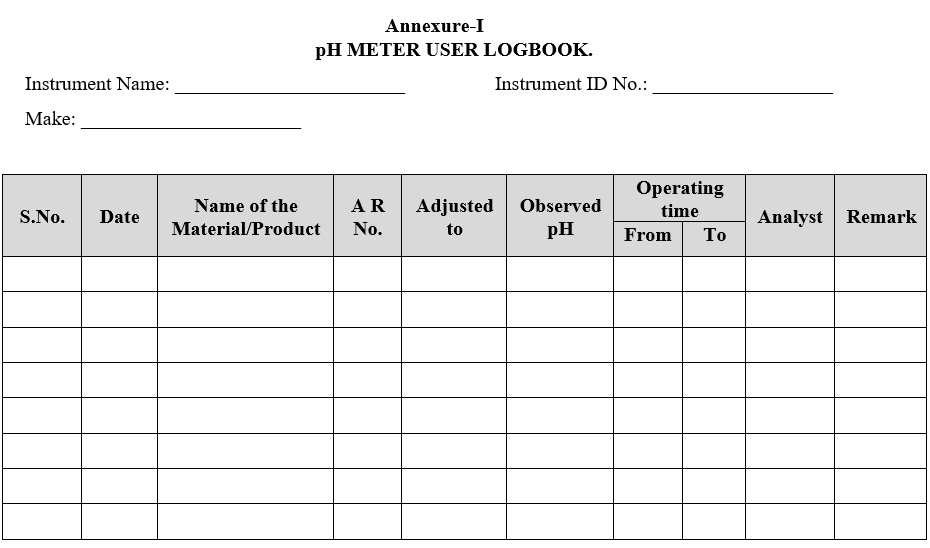
- Enter the details of usage in the logbook.
Click the link to download word file copy of this document:
https://pharmaguidehub.com/product/operation-of-ph-meter-make-thermo-orion/
- ANNEXURES:
| ANNEXURE NO. | TITLE OF ANNEXURE |
| Annexure-I | pH Meter user logbook. |
Annexure-I
pH METER USER LOGBOOK
Click the link to download word file copy of this document:
https://pharmaguidehub.com/product/operation-of-ph-meter-make-thermo-orion/